The Brady Web Print SDK
Overview
The Brady Web SDK was created to allow users to connect and print images to Brady printers from their own custom web page. This SDK is published on npmjs.com in the form of an NPM Package. The package is entirely developed using the newly adopted ES6 syntax in JavaScript. All back-end work is done as client-side scripting.
TRY IT OUT:
Brady hosts and provides a public test app for the Brady Web SDK at https://sdk.bradyid.com/WebSdkDemo.html.
Features Supported
This Web SDK utilizes the Web Bluetooth API for Bluetooth connections to Brady printers. This API is completely documented here. There are several browsers that are not supported by the Web Bluetooth API.
The following chart illustrates which browsers and API methods are supported:
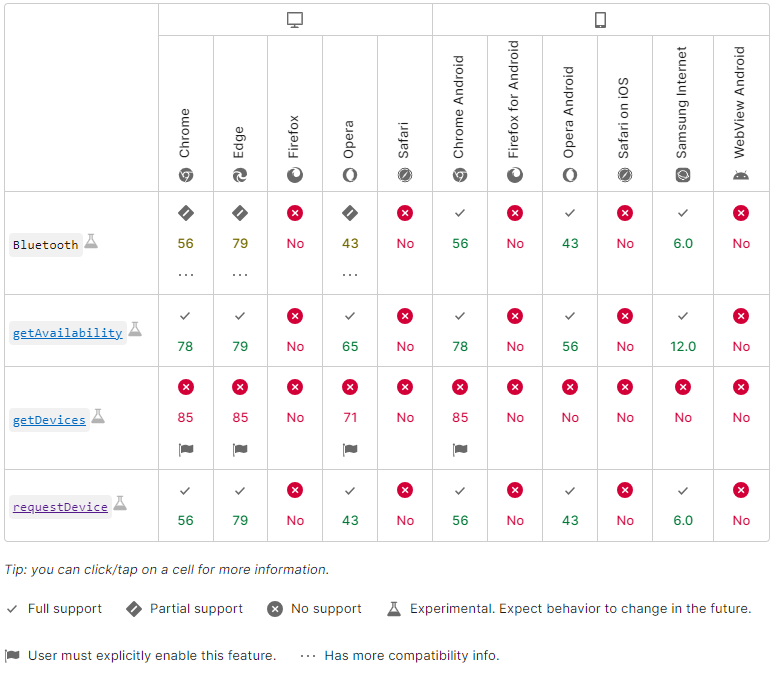
The following chart illustrates which features are supported on each printer:
| Printer Model | Wi-Fi | Bluetooth (Classic) | Bluetooth (Low Energy) | Feed | Cut |
|---|---|---|---|---|---|
| M611 | X | ||||
| M211 | X | X | X | ||
| M511 | X | X | X | ||
| M610 | X | ||||
| M710 | X | ||||
| S3700 | X | ||||
| i7500 (300 dpi) | X | ||||
| i7500 (600 dpi) | X | ||||
| i3311 | X | ||||
| i4311 | X | ||||
| i5311 | X |
Setup
The below steps can also be found in the README.md located in the "node_modules" directory after the package is installed from npmjs.com.
- To install the brady-web-sdk package, navigate to your application's root in a command prompt and use the command:
npm i brady-web-sdk
- Since the brady-web-sdk is not a Node.js module, importing the module requires users to map the import using the script type "importmap". Refer to this article for more details on these imports.
<!-- In the application's index.html/entry point, map the SDK using its installation
path to a custom import name. This name is not required to be "brady-web-sdk". -->

<script type="importmap">
    {
        "imports": {
            "brady-web-sdk": "./node_modules/brady-web-sdk/dist/bundle.js"
        }
    }
</script>
- To use the SDK, you may now use your import name in a JavaScript file like:
import BradySdk from 'brady-web-sdk'
let bradySdk = new BradySdk(printerUpdatesCallback)
- NOTE: By default, the Web SDK collects analytics related to user print jobs. This is done to provide developer insights on how to improve user experience. If you would like to opt out of the collection of analytics, pass in 'false' as the second argument to your instantiation of BradySdk:
let bradySdk = new BradySdk(printerUpdatesCallback, false)
Demo Example
The code below shows how a customer can integrate the Web SDK with their own web page. Refer to the API page for additional details on each of the called API methods used in this example.
view_model.js
//TODO: Change this to './bundle.js' when uploading to sdk.bradyid.com
import BradySdk, { RfidOperation, RfidCommandType, RfidInputType, RfidLocation, MaintenanceStation } from '../brady-web-sdk/dist/bundle.js'

var statusLabel = document.getElementById('statusLabel')
const actionFeedback = document.getElementById('actionFeedback')
const printerConfigurationSection = document.getElementById('printerConfigurationSection')
const quickActionsSection = document.getElementById('quickActionsSection')
const maintenanceStationLabel = document.getElementById('maintenanceStationLabel')
const maintenanceStationControl = document.getElementById('maintenanceStationControl')
const alignmentOffsetLabel = document.getElementById('alignmentOffsetLabel')
const alignmentOffsetControl = document.getElementById('alignmentOffsetControl')
const automaticShutdownTimeLabel = document.getElementById('automaticShutdownTimeLabel')
const automaticShutdownTimeControl = document.getElementById('automaticShutdownTimeControl')
const printQualityModeLabel = document.getElementById('printQualityModeLabel')
const printQualityModeControl = document.getElementById('printQualityModeControl')
const maintenanceStationSelect = document.getElementById('maintenanceStationSelect')
const bradySdk = new BradySdk(printerUpdatesCallback, false) // second argument of 'false' means we will not collect analytics while developing

const imagesToPrint = [];
const imagesToDisplay = [];
let supplyDatabaseFile = null;
let imageIndex = 0;

function populateMaintenanceStationOptions() {
    maintenanceStationSelect.innerHTML = ""

    for (const value of Object.values(MaintenanceStation)) {
        const option = document.createElement('option')
        option.value = value
        option.textContent = value
        maintenanceStationSelect.appendChild(option)
    }
}

populateMaintenanceStationOptions()

//THIS IS CODE TO DISCOVER AND CONNECT TO A PRINTER.
const bleScanButton = document.getElementById('startBleScanButton')
bleScanButton.addEventListener('click', async function(e) {
    const loader = document.querySelector(".spinner-displayer")
    loader.classList.add("loader")

    //DISPLAY CONNECTION STATUS.
    if (await bradySdk.showDiscoveredBleDevices()) {
        actionFeedback.textContent = "Successfully Connected!"
        actionFeedback.style.color = "green"
    }
    else {
        actionFeedback.textContent = "Failed to connect: \n" + bradySdk.getConnectionErrorMessage()
        actionFeedback.style.color = "red"
    }

    loader.classList.remove("loader")
    printerUpdatesCallback(null)
})

const printBrowserButton = document.getElementById('printBrowserPageButton')
printBrowserButton.addEventListener('click', async function(e) {
    //TODO: Update this to 'https://sdk.bradyid.com/PrintPage.html' when uploading test app to sdk.bradyid.com
    location.href = "https://localhost:5500/BradyWebSdkTestApp/PrintPage.html"
})

//CODE TO FEED A LABEL
const feedButton = document.getElementById('feedButton')
feedButton.addEventListener('click', async function(e) {
    const loader = document.querySelector(".spinner-displayer")
    loader.classList.add("loader")

    const feedSuccessful = await bradySdk.feed()

    if(feedSuccessful) {
        actionFeedback.textContent = "Feed Successful!"
        actionFeedback.style.color = "green"
    }
    else {
        actionFeedback.textContent = "Feed Failed..."
        actionFeedback.style.color = "red"
    }

    loader.classList.remove("loader")
})

//CODE TO CUT A LABEL
const cutButton = document.getElementById('cutButton')
cutButton.addEventListener('click', async function(e) {
    const loader = document.querySelector(".spinner-displayer")
    loader.classList.add("loader")

    const cutSuccessful = await bradySdk.cut()

    if(cutSuccessful) {
        actionFeedback.textContent = "Cut Successful!"
        actionFeedback.style.color = "green"
    }
    else {
        actionFeedback.textContent = "Cut Failed..."
        actionFeedback.style.color = "red"
    }

    loader.classList.remove("loader")
})

const cleanPrintheadButton = document.getElementById('cleanPrintheadButton')
cleanPrintheadButton.addEventListener('click', async function(e) {
    const loader = document.querySelector(".spinner-displayer")
    loader.classList.add("loader")

    const successful = await bradySdk.cleanPrinthead()

    if (successful) {
        actionFeedback.textContent = "Clean Printhead Successful!"
        actionFeedback.style.color = "green"
    }
    else {
        actionFeedback.textContent = "Clean Printhead Failed..."
        actionFeedback.style.color = "red"
    }

    loader.classList.remove("loader")
})

const printTestLabelButton = document.getElementById('printTestLabelButton')
printTestLabelButton.addEventListener('click', async function(e) {
    const loader = document.querySelector(".spinner-displayer")
    loader.classList.add("loader")

    const successful = await bradySdk.printTestLabel()

    if (successful) {
        actionFeedback.textContent = "Print Test Label Successful!"
        actionFeedback.style.color = "green"
    }
    else {
        actionFeedback.textContent = "Print Test Label Failed..."
        actionFeedback.style.color = "red"
    }

    loader.classList.remove("loader")
})

const printAlignmentButton = document.getElementById('printAlignmentButton')
printAlignmentButton.addEventListener('click', async function(e) {
    const loader = document.querySelector(".spinner-displayer")
    loader.classList.add("loader")

    const successful = await bradySdk.printAlignmentLabel()

    if (successful) {
        actionFeedback.textContent = "Print Alignment Successful!"
        actionFeedback.style.color = "green"
    }
    else {
        actionFeedback.textContent = "Print Alignment Failed..."
        actionFeedback.style.color = "red"
    }

    loader.classList.remove("loader")
})

const setMaintenanceStationButton = document.getElementById('setMaintenanceStationButton')
setMaintenanceStationButton.addEventListener('click', async function(e) {
    const loader = document.querySelector(".spinner-displayer")
    loader.classList.add("loader")

    const maintenanceStationValue = maintenanceStationSelect.value
    const successful = await bradySdk.setMaintenanceStationProperty(maintenanceStationValue)

    if (successful) {
        actionFeedback.textContent = `Maintenance Station set to ${maintenanceStationValue} successfully!`
        actionFeedback.style.color = "green"
    }
    else {
        actionFeedback.textContent = "Set Maintenance Station Failed..."
        actionFeedback.style.color = "red"
    }

    loader.classList.remove("loader")
})

const setAlignmentOffsetButton = document.getElementById('setAlignmentOffsetButton')
setAlignmentOffsetButton.addEventListener('click', async function(e) {
    const loader = document.querySelector(".spinner-displayer")
    loader.classList.add("loader")

    const alignmentOffset = parseInt(document.getElementById('alignmentOffsetInput').value)
    const successful = await bradySdk.setAlignmentOffset(alignmentOffset)

    if (successful) {
        actionFeedback.textContent = `Alignment Offset Set to ${alignmentOffset}!`
        actionFeedback.style.color = "green"
    }
    else {
        actionFeedback.textContent = "Set Alignment Offset Failed..."
        actionFeedback.style.color = "red"
    }

    loader.classList.remove("loader")
})

const setAutomaticShutdownTimeButton = document.getElementById('setAutomaticShutdownTimeButton')

async function setAutomaticShutdownTime() {
    const loader = document.querySelector(".spinner-displayer")
    loader.classList.add("loader")

    const automaticShutdownTime = parseInt(document.getElementById('automaticShutdownTimeInput').value)
    const successful = await bradySdk.setAutomaticShutdownTime(automaticShutdownTime)

    if (successful) {
        actionFeedback.textContent = `Automatic Shutdown Time Set to ${automaticShutdownTime} Minutes!`
        actionFeedback.style.color = "green"
    }
    else {
        actionFeedback.textContent = "Set Automatic Shutdown Time Failed..."
        actionFeedback.style.color = "red"
    }

    loader.classList.remove("loader")
}

setAutomaticShutdownTimeButton.addEventListener('click', async function(e) {
    await setAutomaticShutdownTime()
})

const printQualityModeSelect = document.getElementById('printQualityModeSelect')
const setPrintQualityModeButton = document.getElementById('setPrintQualityModeButton')
const disconnectButton = document.getElementById('disconnectButton')
const advancedQuickActionButtons = Array.from(document.querySelectorAll('.quick-action-advanced'))

function renderStatusDetails(details) {
    statusLabel.innerHTML = ''
    const fragment = document.createDocumentFragment()

    for (const detail of details) {
        const row = document.createElement('div')
        row.className = 'status-row'

        const key = document.createElement('span')
        key.className = 'status-key'
        key.textContent = detail.label

        const value = document.createElement('span')
        value.className = 'status-value'
        value.textContent = detail.value

        row.appendChild(key)
        row.appendChild(value)
        fragment.appendChild(row)
    }

    statusLabel.appendChild(fragment)
}

function getNormalizedPrinterModel() {
    return (bradySdk.printerModel || "").toUpperCase().trim()
}

function isPiclLiteModel() {
    const model = getNormalizedPrinterModel()
    return model.includes("M211") || model.includes("M511")
}

function isM811JModel() {
    const model = getNormalizedPrinterModel()
    return model.includes("M811J")
}

function updatePrinterConfigurationVisibility() {
    const isConnected = bradySdk.isConnected()
    const isPiclLite = isPiclLiteModel()
    const isM811J = isM811JModel()
    const showPiclLiteConfiguration = isConnected && isPiclLite
    const showM811JConfiguration = isConnected && isM811J
    const shouldShowConfiguration = showPiclLiteConfiguration || showM811JConfiguration

    printerConfigurationSection.hidden = !shouldShowConfiguration

    // M211/M511 must show only automatic shutdown. M811J shows full configuration.
    const showAdvancedConfiguration = showM811JConfiguration
    const showAutomaticShutdown = showPiclLiteConfiguration || showM811JConfiguration
    maintenanceStationLabel.hidden = !showAdvancedConfiguration
    maintenanceStationControl.hidden = !showAdvancedConfiguration
    alignmentOffsetLabel.hidden = !showAdvancedConfiguration
    alignmentOffsetControl.hidden = !showAdvancedConfiguration
    printQualityModeLabel.hidden = !showAdvancedConfiguration
    printQualityModeControl.hidden = !showAdvancedConfiguration
    automaticShutdownTimeLabel.hidden = !showAutomaticShutdown
    automaticShutdownTimeControl.hidden = !showAutomaticShutdown
}

function updateQuickActionsVisibility() {
    const isConnected = bradySdk.isConnected()
    const isPiclLite = isPiclLiteModel()
    const isM811J = isM811JModel()
    const showQuickActions = isConnected && (isPiclLite || isM811J)

    quickActionsSection.hidden = !showQuickActions
    for (const button of advancedQuickActionButtons) {
        button.hidden = !isM811J
    }
}

function updateConnectionUiState() {
    const isConnected = bradySdk.isConnected()
    disconnectButton.disabled = !isConnected
    disconnectButton.classList.toggle('button-disconnect-active', isConnected)
    disconnectButton.classList.toggle('button-secondary', !isConnected)
    updateQuickActionsVisibility()
    updatePrinterConfigurationVisibility()
}

setPrintQualityModeButton.addEventListener('click', async function(e) {
    const loader = document.querySelector(".spinner-displayer")
    loader.classList.add("loader")

    try {
        const selectedMode = printQualityModeSelect.value || "Default"
        bradySdk.setPrinterQualityMode(selectedMode)
        actionFeedback.textContent = `Print Quality Mode Set to ${selectedMode}!`
        actionFeedback.style.color = "green"
    }
    catch (error) {
        actionFeedback.textContent = error?.message || "Set Print Quality Mode Failed..."
        actionFeedback.style.color = "red"
    }

    loader.classList.remove("loader")
})

//HANDLE THE PRINTER UPDATES
function printerUpdatesCallback(changedProperties) {
    updateConnectionUiState()

    if (!bradySdk.isConnected()) {
        statusLabel.textContent = 'Not connected.'
        statusLabel.style.color = ''
        setPrintQualityModeButton.disabled = true
        return
    }

    const statusDetails = [
        { label: "Printer Status", value: `${bradySdk.status}` },
        { label: "Printer Status Message", value: `${bradySdk.message}` },
        { label: "Status Message Title", value: `${bradySdk.messageTitle}` },
        { label: "Remedy Message", value: `${bradySdk.messageRemedy}` },
        { label: "Printer Name", value: `${bradySdk.printerName}` },
        { label: "Printer Model", value: `${bradySdk.printerModel}` },
        { label: "Connection Type", value: "BLE" },
        { label: "Battery Level", value: bradySdk.batteryLevelPercentage == undefined ? "100%" : `${bradySdk.batteryLevelPercentage}%` },
        { label: "Charging", value: `${bradySdk.isAcConnected}` },
        { label: "Supply Name", value: `${bradySdk.supplyName}` },
        { label: "Supply Y Number", value: `${bradySdk.supplyYNumber}` },
        { label: "Supply Remaining", value: `${bradySdk.supplyRemainingPercentage}%` },
        { label: "Supply Dimensions", value: `${bradySdk.supplyDimensions}` },
        { label: "Supply Width", value: `${bradySdk.supplyWidth} inches` },
        { label: "Supply Height", value: `${bradySdk.supplyHeight} inches` },
        { label: "Direct Thermal", value: `${bradySdk.supplyIsDirectThermal}` },
        { label: "Dots Per Inch", value: `${bradySdk.dotsPerInch}` },
        { label: "Post Print Accessory", value: `${bradySdk.postPrintAccessoryType}` },
        { label: "Supply Pre-Sized", value: `${bradySdk.mediaIsDieCut}` },
        { label: "Firmware Version", value: `${bradySdk.firmwareVersionNumber}` },
        { label: "Bluetooth Version", value: `${bradySdk.bluetoothVersionNumber}` },
        { label: "WiFi Version", value: `${bradySdk.wifiVersionNumber}` },
        { label: "Label Library Version", value: `${bradySdk.labelLibraryVersionNumber}` },
        { label: "Available Print Modes", value: bradySdk.availablePrintQualityModes?.join(", ") || "" },
        { label: "Active Print Mode", value: `${bradySdk.printerQualityMode}` }
    ]

    if (bradySdk.ribbonRemainingPercent) {
        statusDetails.splice(12, 0, { label: "Ribbon Remaining", value: `${bradySdk.ribbonRemainingPercent}%` })
    }

    renderStatusDetails(statusDetails)

    const availableModes = (bradySdk.availablePrintQualityModes || []).filter(mode => typeof mode === "string" && mode.length > 0)
    const fallbackModes = ["Default", "Draft", "Precision", "Photo"]
    const modes = availableModes.length > 0 ? availableModes : fallbackModes

    const existingSelection = printQualityModeSelect.value
    printQualityModeSelect.innerHTML = ""
    for (const mode of modes) {
        const option = document.createElement("option")
        option.value = mode
        option.textContent = mode
        printQualityModeSelect.appendChild(option)
    }

    const selectedMode = bradySdk.printerQualityMode || "Default"
    if (modes.includes(selectedMode)) {
        printQualityModeSelect.value = selectedMode
    }
    else if (modes.includes(existingSelection)) {
        printQualityModeSelect.value = existingSelection
    }
    else {
        printQualityModeSelect.value = modes[0]
    }

    setPrintQualityModeButton.disabled = !bradySdk.isConnected() || !isM811JModel()

    if (changedProperties != null) {
        if (changedProperties.length != 0) {
            console.log("Changed Properties:")
            for(var property in changedProperties) {
                console.log("....." + changedProperties[property])
            }
        }
    }

    if (!bradySdk.isSupportedBrowser()) {
        actionFeedback.textContent = "This browser is not supported by the Web Bluetooth API."
        actionFeedback.style.color = "red"
    }
}

//CODE TO PRINT THE SELECTED IMAGE.
const printBitmapButton = document.getElementById('printBitmapButton')
printBitmapButton.addEventListener('click', async function(e) {
    const loader = document.querySelector(".spinner-displayer")
    loader.classList.add("loader")

    const numCopies = document.getElementById('numCopies').value;
    if (numCopies && numCopies > 0) {
        bradySdk.setCopies(parseInt(numCopies))
    }

    const cutOptions = document.getElementById('cutOptions');
    const cutOption = cutOptions.value;
    if (cutOption === "EndOfJob") bradySdk.setCutOption(0);
    else if (cutOption === "EndOfLabel") bradySdk.setCutOption(1);
    else if (cutOption === "Never") bradySdk.setCutOption(2);
    else if (cutOption == "CutAfterRow") bradySdk.setCutOption(3);
    else if (cutOption == "UsePrinterSettings") bradySdk.setCutOption(4);

    let cutAfterRowOption = parseInt(document.getElementById("cutAfterRowOption").value);
    if (cutAfterRowOption) {
        bradySdk.setCutAfterRowValue(cutAfterRowOption)
    }

    // Override the SDKs embedded supply database with a specified one
    await bradySdk.setSupplyDatabase(supplyDatabaseFile)

    // const rfidOperations = [
    //     [
    //         new RfidOperation(RfidCommandType.Write, RfidInputType.Ascii, RfidLocation.ElectronicProductCode, "1AAAAAAAAAA", null, 0, null, null),
    //         new RfidOperation(RfidCommandType.Write, RfidInputType.Hex, RfidLocation.User, "AAAAAAAAAA", null, 0, null, null)
    //     ],
    //     [
    //         new RfidOperation(RfidCommandType.Write, RfidInputType.Ascii, RfidLocation.ElectronicProductCode, "2BBBBBBBBBB", null, 0, null, null),
    //         new RfidOperation(RfidCommandType.Write, RfidInputType.Hex, RfidLocation.User, "BBBBBBBBBB", null, 0, null, null)
    //     ],
    //     [
    //         new RfidOperation(RfidCommandType.Write, RfidInputType.Ascii, RfidLocation.ElectronicProductCode, "3CCCCCCCCCC", null, 0, null, null),
    //         new RfidOperation(RfidCommandType.Write, RfidInputType.Hex, RfidLocation.User, "CCCCCCCCCC", null, 0, null, null)
    //     ]
    // ];

    const printingStatus = await bradySdk.printBitmaps(imagesToPrint, 0, 0, /*rfidOperations*/)
    if(printingStatus) {
        actionFeedback.textContent = "Printed Successfully!"
        actionFeedback.style.color = "green"
    }
    else {
        actionFeedback.textContent = "Failed to print..."
        actionFeedback.style.color = "red"
    }

    loader.classList.remove("loader")
})

//DISCONNECT FROM PRINTER FUNCTIONALITY
disconnectButton.addEventListener('click', async function(e) {
    const disconnectStatus = await bradySdk.disconnect()
    if (disconnectStatus) {
        quickActionsSection.hidden = true
        printerConfigurationSection.hidden = true
        disconnectButton.disabled = true
        disconnectButton.classList.remove('button-disconnect-active')
        disconnectButton.classList.add('button-secondary')
        statusLabel.textContent = 'Not connected.'
        statusLabel.style.color = ''
        actionFeedback.textContent = "Disconnected Successfully!"
        actionFeedback.style.color = "green"
    }
    else {
        updateConnectionUiState()
        actionFeedback.textContent = "Disconnect Failed..."
        actionFeedback.style.color = "red"
    }
})

updateConnectionUiState()

// CODE TO SELECT AND DISPLAY IMAGE TO PRINT.
const imageInput = document.getElementById('imageInput'); // File input element
const previewContainer = document.getElementById('previewContainer'); // Container to display selected images

// Handle file selection
imageInput.addEventListener('change', (event) => {
    const files = Array.from(event.target.files);
    files.forEach(async (file) => {
        if (validFileType(file)) {
            if (file.type === 'application/pdf') {
                let images = await bradySdk.parsePdfToImages(file);
                for (let i = 0; i < images.length; i++) {
                    imagesToPrint.push(images[i]);
                    imagesToDisplay.push({ file: images[i], url: images[i].src });
                    localStorage.setItem(`imageToPrint${imageIndex}`, imagesToPrint[imageIndex].src);
                    imageIndex++;
                    displayImages();
                }
            } else if (file.type === 'text/xml' || file.type === 'application/octet-stream') {
                supplyDatabaseFile = file;
            } else {
                // Store the File object and a display URL
                const imageToPrint = document.createElement("img")
                const imageUrl = URL.createObjectURL(file);
                imageToPrint.src = imageUrl;
                imagesToPrint.push(imageToPrint);
                imagesToDisplay.push({ file: file, url: imageUrl });
                localStorage.setItem(`imageToPrint${imageIndex}`, imagesToPrint[imageIndex].url)
                imageIndex++;
                displayImages();
            }
        }
    });
});

function removeImage(index) {
    // Clean up the Blob URL when removing
    URL.revokeObjectURL(imagesToPrint[index].src);
    imagesToPrint.splice(index, 1);
    imagesToDisplay.splice(index, 1);
    imageIndex--;
    displayImages();
}

// Function to display selected images
function displayImages() {
    previewContainer.innerHTML = ''; // Clear the container
    imagesToDisplay.forEach((image, index) => {
        const imageWrapper = document.createElement('div');
        imageWrapper.classList.add('image-wrapper');

        const img = document.createElement('img');
        img.src = image.url;
        img.alt = `Selected Image ${index + 1}`;
        img.classList.add('preview-image');

        const removeButton = document.createElement('button');
        removeButton.textContent = 'Remove';
        removeButton.classList.add('remove-button');
        removeButton.addEventListener('click', () => {
            removeImage(index);
        });

        imageWrapper.appendChild(img);
        imageWrapper.appendChild(removeButton);
        previewContainer.appendChild(imageWrapper);
    });
}

// Function to handle the checkbox change event
function handleCollateCheckboxChange() {
    const collateCheckbox = document.getElementById('collateCheckbox');
    collateCheckbox.addEventListener('change', () => {
        const isChecked = collateCheckbox.checked;
        bradySdk.setCollate(isChecked); // Call bradySdk.setCollate with true or false
    });
}

// Call the function to attach the event listener
handleCollateCheckboxChange();

window.toggleCutAfterRowOption = function toggleCutAfterRowOption() {
    const cutOptions = document.getElementById("cutOptions").value;
    const cutAfterRowContainer = document.getElementById("cutAfterRowContainer");

    if (cutOptions === "CutAfterRow") {
        cutAfterRowContainer.style.display = "block";
    } else {
        cutAfterRowContainer.style.display = "none";
    }
};

const fileTypes = [
  "image/apng",
  "image/bmp",
  "image/gif",
  "image/jpeg",
  "image/pjpeg",
  "image/png",
  "image/svg+xml",
  "image/tiff",
  "image/webp",
  "image/x-icon",
  'application/pdf',
  'text/xml',
  'application/octet-stream'
];

function validFileType(file) {
    return fileTypes.includes(file.type)
}
WebSdkDemo.html
<!DOCTYPE html>
<html>
    <head>
        <meta charset="utf-8">
        <meta name="viewport" content="width=device-width, initial-scale=1">
        <title>Brady Web SDK</title>
        <link rel="stylesheet" href="style.css">
    </head>
    <body>
        <main class="page-shell">
            <section class="hero">
                <h1>Brady Web SDK Demo</h1>
                <p class="legacy-welcome">Welcome - 3.3.0</p>
                <p>This is the home page of the Brady Web SDK test application.</p>
                <div class="hero-actions">
                    <button type="button" id="startBleScanButton">Start Bluetooth Scan</button>
                    <button type="button" id="disconnectButton" class="button-secondary" disabled>Disconnect</button>
                    <button type="button" id="printBrowserPageButton" class="button-secondary">Print Browser Page</button>
                </div>
                <p id="actionFeedback" class="action-feedback"></p>
            </section>

            <section class="panel print-job-panel">
                <h2>Print Job</h2>
                <form method="post" enctype="multipart/form-data" class="upload-form">
                    <label for="imageInput" class="file-label">Select Images, PDF, or Supply Database</label>
                    <input type="file" id="imageInput" multiple>
                    <div id="previewContainer" class="preview-container">
                        <p>No files currently selected for upload</p>
                    </div>
                </form>

                <div class="control-grid print-grid">
                    <label for="numCopies">Number of Copies</label>
                    <input type="number" id="numCopies" name="numCopies" min="1" value="1">

                    <label for="cutOptions">Cut Option</label>
                    <select name="cutOptions" id="cutOptions" onchange="toggleCutAfterRowOption()">
                        <option value="EndOfJob">EndOfJob</option>
                        <option value="EndOfLabel">EndOfLabel</option>
                        <option value="Never">Never</option>
                        <option value="CutAfterRow">CutAfterRow</option>
                        <option value="UsePrinterSettings">UsePrinterSettings</option>
                    </select>

                    <div id="cutAfterRowContainer" class="cut-after-row" style="display: none;">
                        <label for="cutAfterRowOption">Cut After Row</label>
                        <input type="number" id="cutAfterRowOption" name="cutAfterRowOption" min="0" value="0">
                    </div>

                    <label for="collateCheckbox" class="toggle-label">
                        <input type="checkbox" id="collateCheckbox">
                        <span>Enable Collate</span>
                    </label>
                </div>

                <div class="action-row">
                    <button type="button" id="printBitmapButton">Print</button>
                </div>
            </section>

            <section class="panel status-panel">
                <h2>Printer Status</h2>
                <div id="statusLabel" class="status-output">Not connected.</div>
            </section>

            <section id="quickActionsSection" class="panel quick-actions-panel" hidden>
                <h2>Printer Operations</h2>
                <div class="button-cluster">
                    <button type="button" id="feedButton">Feed</button>
                    <button type="button" id="cutButton">Cut</button>
                    <button type="button" id="cleanPrintheadButton" class="quick-action-advanced">Clean Printhead</button>
                    <button type="button" id="printTestLabelButton" class="quick-action-advanced">Print Test Label</button>
                    <button type="button" id="printAlignmentButton" class="quick-action-advanced">Print Alignment</button>
                </div>
            </section>

            <section id="printerConfigurationSection" class="panel printer-config-panel" hidden>
                <h2>Printer Configuration</h2>
                <div class="control-grid">
                    <label id="maintenanceStationLabel" for="maintenanceStationSelect">Maintenance Station</label>
                    <div id="maintenanceStationControl" class="inline-input-group">
                        <select id="maintenanceStationSelect"></select>
                        <button type="button" id="setMaintenanceStationButton">Set</button>
                    </div>

                    <label id="alignmentOffsetLabel" for="alignmentOffsetInput">Alignment Offset</label>
                    <div id="alignmentOffsetControl" class="inline-input-group">
                        <input type="number" id="alignmentOffsetInput" value="0" step="1">
                        <button type="button" id="setAlignmentOffsetButton">Set</button>
                    </div>

                    <label id="automaticShutdownTimeLabel" for="automaticShutdownTimeInput">Automatic Shutdown Time (mins)</label>
                    <div id="automaticShutdownTimeControl" class="inline-input-group">
                        <input type="number" id="automaticShutdownTimeInput" min="0" value="30">
                        <button type="button" id="setAutomaticShutdownTimeButton">Set</button>
                    </div>

                    <label id="printQualityModeLabel" for="printQualityModeSelect">Print Quality Mode</label>
                    <div id="printQualityModeControl" class="inline-input-group">
                        <select id="printQualityModeSelect">
                            <option value="Default">Default</option>
                        </select>
                        <button type="button" id="setPrintQualityModeButton">Apply</button>
                    </div>
                </div>
            </section>
        </main>

        <div class="spinner-displayer"></div>
        <script type="module" src="view_model.js"></script>
    </body>
</html>