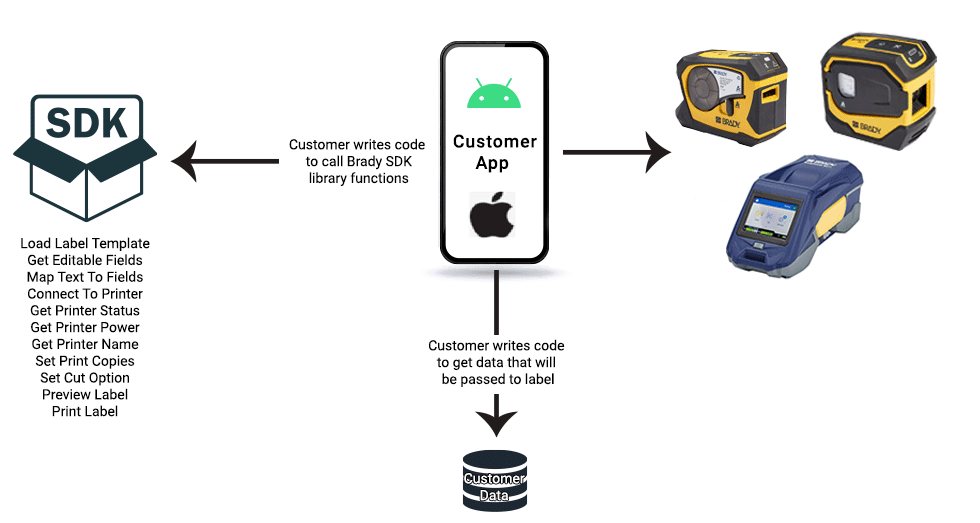
What is the Brady SDK?
Latest: Version 3.3 as of 10/29/20206
The Brady Software Development Kit (SDK) enables users to build applications that discover, connect, and print to Brady printers.
We provide native SDKs for Android and iOS, a Web SDK, and cross-platform binding packages built on the Flutter, Xamarin, and .NET MAUI frameworks. An example React Native binding is also provided. For integrating Brady Printers with desktop applications, we provide a C/C++ SDK with a .NET wrapper.
The Android and iOS SDKs are modeled after Brady's mobile application "Express Labels," each implemented in its platform's native language. Note that the SDKs do not support all features available in Express Labels, though we continue to close that gap. The Web and Desktop SDKs currently support bitmap printing; printing Brady Workstation labels directly is not supported in either.
For a list of supported features and printers in each SDK, see the Supported Components page.
Android
To download the Android SDK, add the following to your app-level build.gradle in Android Studio:
implementation 'com.bradyid:BradySdk:3.3.1'
Download a Demo App for the Brady Android SDK
Download an APK of the Demo App here
iOS
Download the iOS SDK from bradyid.com
Download the Brady Print SDK demo app from the iOS App Store here
Download the source code of the Demo App for the Brady iOS SDK
Web
The Web SDK can be found on npmjs.com and downloaded using the following console command:
npm i @bradycorporation/brady-web-sdk
Try out the Web SDK Demo app here: https://sdk.bradyid.com/WebSdkDemo.html
Desktop
The Desktop SDK can be found in the nuget.org gallery and added to a .NET project with the following console command:
dotnet add package BradyCorp.Desktop.SDK
An example C++ program is included in the NuGet package.